
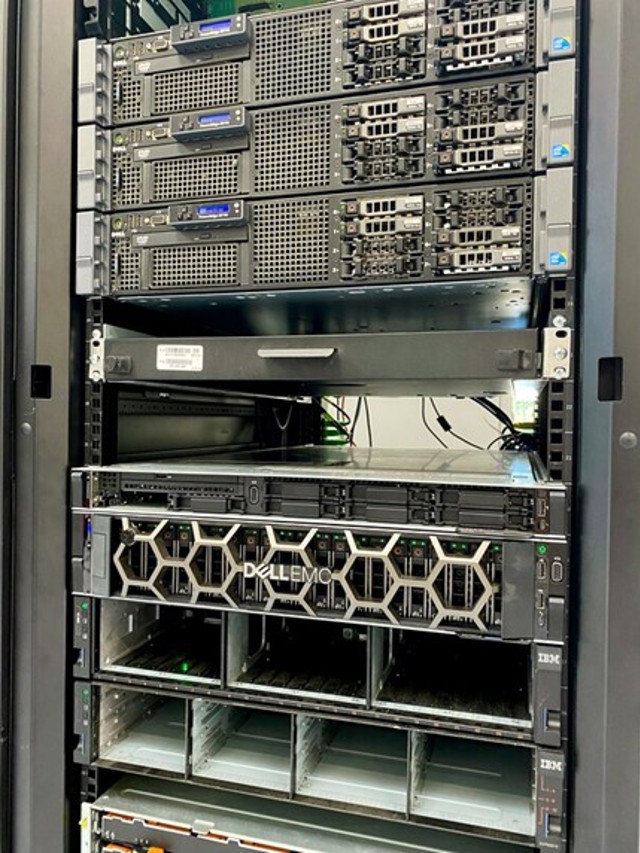
What Is a Server?
A server is a computer or software system that provides data, services, or resources to other computers, often called clients. When you visit a website, send an email, stream a video, or save a file to a shared drive, a server may be handling the request behind the scenes.
How Servers Work
Servers operate over a network. A client sends a request—for example, asking to load a webpage—and the server processes it and returns a response. The server might retrieve a file, run an application, search a database, or perform several tasks before sending information back.
Servers can be physical machines in a data center, virtual machines running on shared hardware, or cloud-based services delivered over the internet. A server does not have to be a dedicated physical computer; in many cases, server software runs on hardware that also hosts other services.
Common Types of Servers
- Web servers deliver website files and content to browsers.
- Application servers run software and handle tasks such as processing forms or applying business rules.
- Database servers store and manage information that applications need to retrieve or update.
- File servers let users store, access, and share files over a network.
- Mail servers send, receive, and store email.
- DNS servers help translate domain names, such as example.com, into the network addresses computers use to find services.
Servers at Home and at Work
Servers are used by organizations of every size. A large company might run many servers to support websites, internal applications, databases, backups, and employee accounts. A small business may rely on a cloud provider instead of maintaining its own equipment.
Servers can also be useful at home. A home server might store media, back up computers, host a personal website, or share files among household devices. The right setup depends on what it needs to do, how many people will use it, and how much maintenance the owner is prepared to handle.
Choosing a Server
Choosing a server starts with understanding the workload. Important factors include the number of users, the amount of data, expected performance, storage needs, availability requirements, and budget. Some workloads benefit from more memory or processing power, while others need fast storage or reliable network connections.
Organizations also decide whether to operate servers on-site, rent dedicated hardware, or use cloud services. On-site servers offer direct control but require equipment, space, power, and ongoing maintenance. Cloud services can be easier to scale, though costs and configuration need to be managed carefully.
Security and Maintenance
Because servers often store important data or provide essential services, they need regular care. Common practices include installing security updates, using strong authentication, limiting access, monitoring activity, and making tested backups. Encryption can help protect information while it is being transmitted or stored.
Reliable servers also require monitoring and maintenance. Administrators may track performance, storage capacity, errors, and availability to identify problems before they cause a service interruption. For critical systems, organizations often use backup servers or other recovery plans to reduce downtime.
Why Servers Matter
Servers are a foundation of modern computing. They make it possible for people and organizations to share information, run applications, and access services across local networks and the internet. Whether hosted in a data center, in the cloud, or at home, a server helps turn individual devices into connected systems.
Server FAQs: 9 Common Questions Answered
- What is a server?
- How does a server work?
- What are the different types of servers?
- What is the difference between a server and a regular computer?
- What is a server used for?
- How do I choose the right server for my needs?
- What is the difference between a physical server and a cloud server?
- How do I secure a server?
- How much does it cost to run a server?
What is a server?
A server is a computer or software program that provides data, services, or resources to other devices, called clients, over a network. For example, when you visit a website, a web server sends the page to your browser; other servers may store files, manage databases, or deliver email.
How does a server work?
A server works by receiving requests from other devices, called clients, over a network and sending back the information or service they need. For example, when you open a website, your browser requests its content from a web server, which finds the relevant files or data and returns them for the browser to display. Depending on its purpose, a server may also run applications, manage databases, store files, or handle email.
What are the different types of servers?
Servers are designed for different tasks. Web servers deliver websites to browsers, while application servers run software and process requests. Database servers store and manage information, and file servers provide shared access to documents and other files. Mail servers handle sending and receiving email, while DNS servers translate domain names into the network addresses computers use to locate services. Some servers perform several roles, depending on the needs of the organization or network.
What is the difference between a server and a regular computer?
A server is a computer designed or configured to provide services, data, or resources to other devices over a network, while a regular computer is typically used directly by one person for everyday tasks like browsing, writing, and gaming. Servers are often built to run continuously, handle many requests at once, and offer features such as larger storage capacity, stronger reliability, and remote administration. However, the distinction is not absolute: a regular computer can act as a server if it runs software that provides services to other devices.
What is a server used for?
A server is used to provide data, applications, or other resources to devices and users over a network. For example, web servers deliver websites, file servers store and share documents, email servers handle messages, and database servers organize information for apps and businesses. Servers can be physical computers, virtual machines, or cloud-based services.
How do I choose the right server for my needs?
Choosing the right server starts with identifying what it needs to do, how many people or devices will use it, and how much data it must handle. Consider performance needs, storage capacity, reliability, security, room for future growth, and your budget. Then compare hosting options: an on-site server offers more direct control but requires equipment and maintenance, while a cloud or managed server can be easier to scale and support. If you’re unsure, ask a qualified IT professional to assess your requirements before you buy.
What is the difference between a physical server and a cloud server?
A physical server is a dedicated computer installed on-site or in a data center, giving its owner direct control over the hardware, configuration, and maintenance. A cloud server is a virtual server hosted on a cloud provider’s shared infrastructure and accessed over the internet. Physical servers can offer greater hardware control and predictable performance, but they require upfront investment and ongoing upkeep. Cloud servers are typically faster to set up and easier to scale, with costs based on usage, though they depend on the provider’s services and pricing. The right choice depends on your budget, performance needs, technical resources, and how much control you want.
How do I secure a server?
To secure a server, keep its operating system and software updated, remove or disable services you don’t need, and restrict network access with a firewall. Use strong, unique credentials and multi-factor authentication where available, give accounts only the permissions they need, and prefer secure access methods such as SSH keys. Encrypt sensitive data and connections, make regular backups, and monitor logs for unusual activity. Security needs vary by server and its purpose, so review settings regularly and follow guidance from the software and hosting providers.
How much does it cost to run a server?
The cost of running a server depends on its workload, performance needs, and how it’s hosted. A small cloud server may cost just a few dollars per month, while a powerful or high-availability setup can cost hundreds or more, not including storage, bandwidth, software licenses, backups, and support. Running a server on-site also adds hardware, electricity, cooling, and maintenance costs. To estimate the total, consider both the monthly hosting expense and the time and resources needed to keep the server secure and reliable.
