
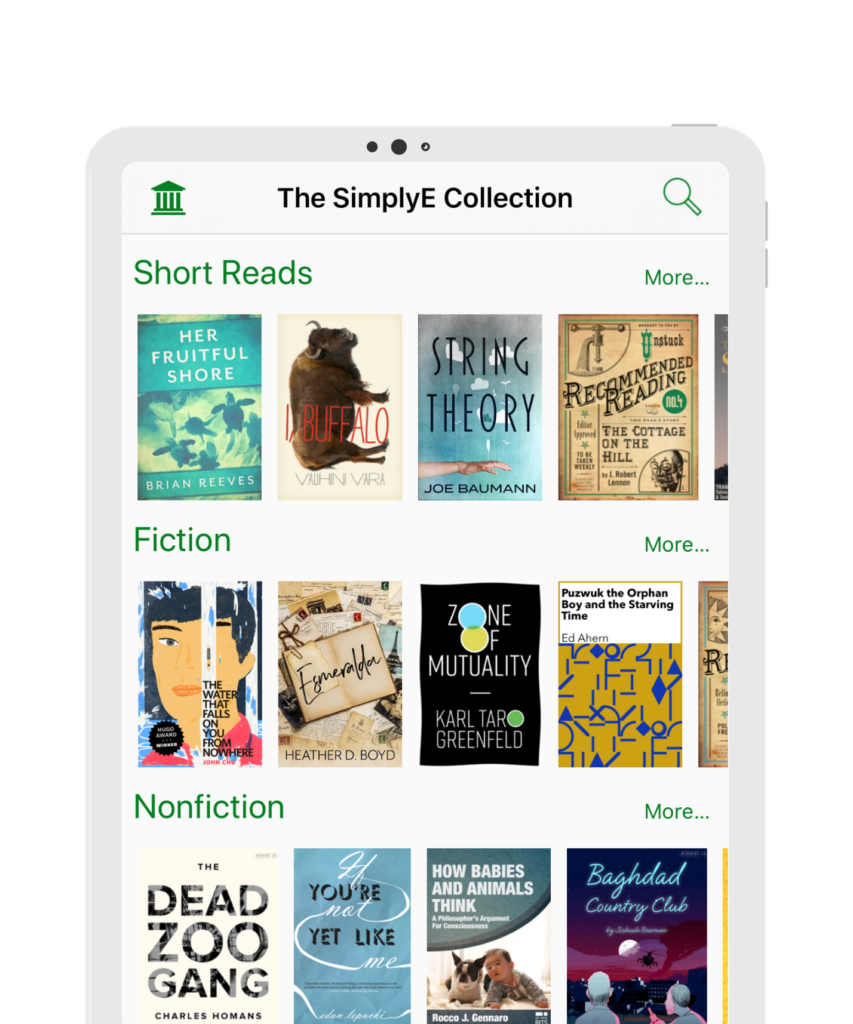
Online Libraries: A World of Knowledge at Your Fingertips
An online library makes books, research, historical documents, and other learning resources available through the internet. Instead of traveling to a physical location, readers can browse a digital collection from a computer, tablet, or phone. Many online libraries are open around the clock, making it easier to find information whenever and wherever it is needed.
What Can You Find in an Online Library?
Online library collections vary widely. Some focus on a particular subject, community, or period in history, while others offer resources across many fields. Depending on the collection, readers may find:
- E-books and digitized print books
- Academic papers, journals, and reports
- Newspapers, photographs, and historical documents
- Audiobooks, videos, maps, and other media
- Learning guides and reference materials
Some resources can be read directly in a web browser, while others can be downloaded or borrowed for a limited time. Access rules depend on the library and the rights associated with each item.
Benefits of Online Libraries
Convenient access: Digital collections can be available at any hour, without a trip to a library building. This is especially useful for people who live far from a physical library or have limited mobility.
Fast discovery: Search tools can help readers find titles, subjects, authors, or specific words within documents. Filters may narrow results by date, format, language, or topic.
Support for learning and research: Students, educators, researchers, and curious readers can explore a broad range of materials in one place. Digitized primary sources can also help readers study the past through original documents and images.
Preservation: Digitization can help protect fragile or rare materials by creating copies that can be accessed without repeatedly handling the originals. Digital preservation requires ongoing care, including reliable storage and attention to changing file formats.
How to Use an Online Library Effectively
- Start with a clear question. A focused topic can make searching more productive.
- Choose useful search terms. Try alternate spellings, related phrases, and broader or narrower keywords.
- Check the details. Review the author, publication date, source, and any notes about the item’s history or completeness.
- Keep track of sources. Save citations or links as you research so you can return to them later.
- Understand access and reuse terms. Being able to view an item online does not necessarily mean it can be copied, shared, or republished without permission.
Choosing a Reliable Online Library
Look for clear information about the organization behind the collection, the sources of its materials, and how items are described. Good catalog records provide details such as title, creator, date, and subject. For research, compare important claims across multiple dependable sources, since a digital collection may contain incomplete records or materials reflecting the limitations of their original context.
A Growing Resource for Readers Everywhere
Online libraries connect people with knowledge across distance and time. They make it easier to discover books, conduct research, and explore cultural and historical materials. As digital collections continue to grow, thoughtful searching and careful evaluation can help readers make the most of this increasingly valuable resource.
9 Tips for Making the Most of Your Online Library
- Use clear keywords when searching.
- Filter results by format or date.
- Check whether an item is available online.
- Save useful titles to your reading list.
- Use your library card to sign in.
- Explore audiobooks and e-books.
- Review borrowing periods and renewal rules.
- Use trusted databases for research.
- Ask a librarian for help finding sources.
Use clear keywords when searching.
Use clear, specific keywords when searching an online library to find relevant resources more quickly. Think about the main subject, author, title, or time period you’re interested in, and try related terms if your first search returns too few or too many results. For example, searching “American women’s suffrage” may be more useful than searching “history.”
Filter results by format or date.
Filter your search results by format or date to find the materials that best fit your needs. Choose a format such as e-books, articles, or audiobooks, or set a date range to focus on newer publications or historical sources. These filters can save time and make a large online library collection easier to explore.
Check whether an item is available online.
Before planning to read or use a particular resource, check whether the online library provides it digitally. Search the catalog by title, author, or keyword, then review the item’s record for an online access link, available formats, and any borrowing or download requirements. Some listings describe materials held only at a physical location, while others may offer a preview rather than full access.
Save useful titles to your reading list.
Save useful titles to your reading list as you browse an online library. This makes it easy to return to books, articles, and other resources that catch your interest without having to search for them again. Organize saved titles by topic or project, and review the list regularly to choose what to read next.
Use your library card to sign in.
Use your library card to sign in to your online library account and unlock the digital resources available through your local library. Depending on your library’s collection, you may be able to borrow e-books and audiobooks, access research databases, or read newspapers and magazines. Keep your card number and PIN handy, and contact the library if you have trouble logging in.
Explore audiobooks and e-books.
Explore audiobooks and e-books to enjoy library resources in the format that works best for you. E-books are easy to search, carry, and read on a phone, tablet, or e-reader, while audiobooks let you listen during a commute, workout, or quiet break. Many online libraries offer both formats, so you can discover new authors, revisit favorite titles, and make reading fit your schedule.
Review borrowing periods and renewal rules.
Before borrowing an e-book or audiobook from an online library, check the loan period and renewal rules. Digital items may be returned automatically when the borrowing period ends, and some libraries limit how many times a loan can be renewed. If you need more time, renew the item before it expires, as long as no one else is waiting for it. Keeping track of due dates helps you avoid interruptions and makes it easier to plan your reading.
Use trusted databases for research.
Use trusted databases when researching online to find accurate, well-sourced information. Libraries, universities, and established research organizations often provide databases with scholarly articles, books, and primary sources that have been reviewed or carefully selected. Check who published each source, when it was updated, and whether it supports your topic before relying on it.
Ask a librarian for help finding sources.
If you’re having trouble finding reliable sources in an online library, ask a librarian for help. Librarians can suggest useful search terms, recommend databases or collections, and show you how to narrow results to fit your topic. They can also help you evaluate sources and track down materials that may be difficult to find on your own.
