
Kindle E-Books: A Guide to Reading Digitally
Kindle e-books make it possible to carry a large reading library on a dedicated e-reader, smartphone, tablet, or computer. They offer a convenient alternative to printed books, with features such as adjustable text, built-in dictionaries, and the ability to sync reading progress across compatible devices.
What Is a Kindle E-Book?
A Kindle e-book is a digital book designed to be read using Amazon’s Kindle devices or Kindle apps. Readers can browse and purchase titles through Amazon, then download them to a compatible device or app. Many Kindle books can also be read offline after they have been downloaded.
Kindle e-books cover a wide range of genres and subjects, including fiction, nonfiction, textbooks, comics, and cookbooks. Some titles are available in digital form only, while others are also published as print books or audiobooks.
Where You Can Read Kindle Books
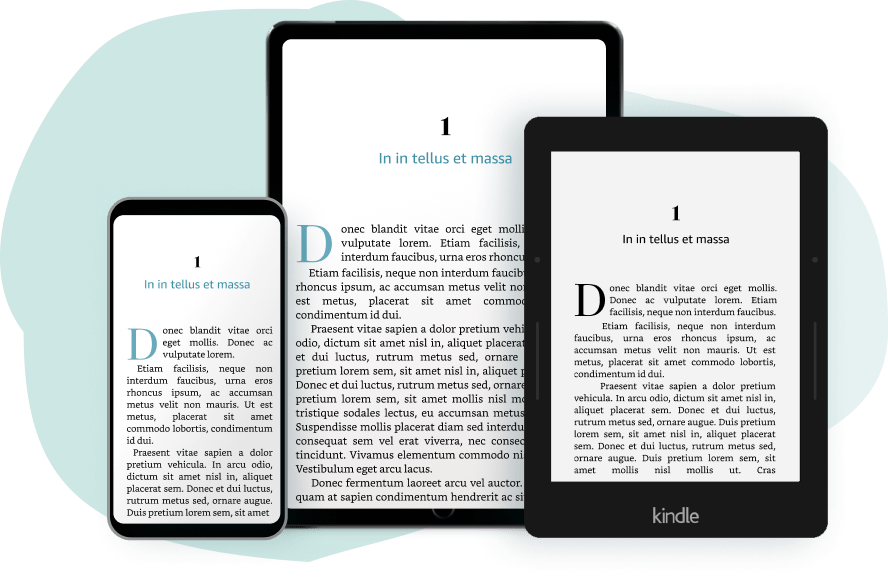
You do not necessarily need a Kindle e-reader to read Kindle books. The Kindle app is available for many smartphones and tablets, and Kindle reading options are also available on computers through compatible apps or web services. Kindle e-readers are designed specifically for reading and typically use an e-ink display that can be easier to view for long periods than a standard backlit screen.
Useful Kindle Features
- Adjustable text: Change the font size, typeface, spacing, and page layout in many books.
- Dictionary and search: Look up words or search for a name, phrase, or passage.
- Highlights and notes: Mark important passages and add personal notes.
- Progress syncing: Continue reading from the last-synced position on another compatible device.
- Accessibility options: Depending on the device, app, and book, readers may have access to features such as screen readers, larger text, or other assistive settings.
Buying, Borrowing, and Subscription Options
Kindle books can be purchased individually through Amazon. Some readers may also have access to borrowing or subscription services, such as Kindle Unlimited or Prime Reading. The titles included in these services, eligibility, and terms can vary by location and change over time, so it is worth checking the details before signing up.
Public libraries may offer e-books through digital lending platforms. Availability depends on the library and the title. Check your library’s website to learn which services it supports and whether a specific book can be borrowed for Kindle reading.
Things to Consider Before Choosing an E-Book
Digital books are convenient, but they do not always work like printed books. Kindle purchases are generally associated with an Amazon account and are subject to the applicable terms and regional availability. A book’s layout may also differ from its print edition, particularly for illustrated books, comics, and textbooks. Previewing a sample can help you decide whether the digital format suits your needs.
Price is another consideration. E-book prices vary by title, publisher, country, and promotion. Comparing the digital price with the print edition, checking for library availability, and reviewing subscription terms can help you choose the option that works best.
Getting Started
- Choose a Kindle e-reader or install the Kindle app on a compatible device.
- Sign in with an Amazon account.
- Browse for a book, check its format and price, and purchase or borrow it if available.
- Download the title and adjust the reading settings to suit your preferences.
Whether you read occasionally or keep several books in progress, Kindle e-books offer a flexible way to enjoy digital reading. With a wide selection of titles and tools for customizing the reading experience, they can make it easier to take books along wherever you go.
9 Reasons to Love Kindle E-Books: Convenience, Customization, and More
- Portable library on one device
- Adjustable font size
- Built-in dictionary lookup
- Quick word and phrase search
- Highlights and notes
- Reading progress syncs across devices
- Many titles available for instant download
- Can read offline after downloading
- Often includes adjustable display settings
7 Drawbacks of Kindle E-Books You Should Consider
- Requires a compatible device or app.
- Depends on battery power.
- Some titles cost as much as print books.
- Purchases are tied to Amazon’s ecosystem.
- Digital rights restrictions may limit sharing.
- Screen reading may cause eye strain.
- Illustrated books may not display well.
Portable library on one device
One of the biggest advantages of Kindle e-books is having a portable library in a single device. Instead of carrying several printed books, you can bring hundreds or even thousands of titles on a Kindle e-reader, phone, or tablet. That makes it easy to choose what to read while traveling, commuting, or relaxing at home, without adding much weight to your bag.
Adjustable font size
One helpful advantage of Kindle e-books is the ability to adjust the font size to suit your needs. You can enlarge the text for easier reading or make it smaller to fit more words on the screen, without changing the lighting or carrying a magnifying glass. This flexibility can make reading more comfortable for people with low vision, those who prefer larger print, or anyone who wants to customize the page for different devices and settings.
Built-in dictionary lookup
Kindle e-books make it easy to look up unfamiliar words without interrupting your reading. Simply tap or select a word to see its definition, then return to the page right away. This built-in dictionary is especially useful for readers exploring new subjects, learning vocabulary, or reading books with challenging language.
Quick word and phrase search
Kindle e-books make it easy to find a specific word, phrase, or passage without flipping through pages. Use the search feature to locate a character’s name, revisit a key idea, or jump to a section you remember. It’s a handy time-saver for both casual reading and studying.
Highlights and notes
Kindle e-books make it easy to highlight important passages and add notes as you read. Whether you’re studying, researching, or saving a favorite quote, you can mark key ideas without writing in the margins of a printed book. Your annotations are stored digitally, so they’re easy to revisit when you need to review a chapter or find a specific passage.
Reading progress syncs across devices
One of the biggest advantages of Kindle e-books is that your reading progress can sync across compatible devices. Start a book on your Kindle e-reader, then pick it up later in the Kindle app on your phone or tablet, right where you left off. This makes it easy to keep reading wherever you are, without having to remember the page or chapter.
Many titles available for instant download
One of the biggest advantages of Kindle e-books is that many titles are available for instant download. After purchasing or borrowing a book, readers can often start reading within moments—no trip to a bookstore or wait for shipping required. This makes it easy to find a new read at home, while traveling, or whenever the mood strikes.
Can read offline after downloading
One of the biggest advantages of Kindle e-books is that you can read them offline after downloading them to your device. This makes it easy to enjoy a book on a flight, during a commute, or anywhere with limited or no internet access. Once downloaded, your book stays available on your device, so you can keep reading without worrying about your connection.
Often includes adjustable display settings
Kindle e-books often include adjustable display settings that let readers tailor the page to their preferences. Depending on the device, app, and book, you can change the font size, typeface, brightness, and background color to make text more comfortable to read in different lighting conditions. These options can be especially helpful for long reading sessions or when you want larger, clearer text.
Requires a compatible device or app.
One drawback of Kindle e-books is that they require a compatible device or app to read. Unlike a printed book, a Kindle title can’t be opened and read on its own; readers need a supported Kindle e-reader, smartphone, tablet, or computer with Kindle software. This may be inconvenient for people who don’t own a compatible device, prefer reading on paper, or want to avoid using a screen.
Depends on battery power.
One drawback of Kindle e-books is that reading depends on battery power. If your Kindle or phone runs out of charge, you may have to stop reading until you can recharge it. This can be inconvenient when traveling, spending time outdoors, or away from an outlet, so it helps to charge your device ahead of time and keep a charger or power bank handy.
Some titles cost as much as print books.
One drawback of Kindle e-books is that some titles cost nearly as much as their print editions. Although digital books don’t require paper or physical shipping, their prices are set by publishers and retailers, so savings aren’t guaranteed. Before buying, compare the e-book price with the print version and check for library loans, sales, or subscription options.
Purchases are tied to Amazon’s ecosystem.
One drawback of Kindle e-books is that purchases are generally tied to Amazon’s ecosystem. Books are associated with an Amazon account and are usually read through Kindle devices or apps, which can make it harder to move your library to another platform. Before choosing Kindle, consider how much flexibility you want to have if you switch devices or e-book services later.
Digital rights restrictions may limit sharing.
Digital rights restrictions can limit how Kindle e-books are shared. Unlike a print book, which can usually be lent or given to someone else, a digital title may be tied to the purchaser’s account and subject to publisher or platform rules. Some books can be loaned only for a limited time—or not shared at all—so it’s worth checking the borrowing options before buying.
Screen reading may cause eye strain.
Reading Kindle e-books on a phone, tablet, or other backlit screen for long periods may contribute to eye strain, dryness, or headaches, especially in dim lighting. Taking regular breaks, adjusting brightness and text size, and using a dedicated e-reader with an e-ink display may make reading more comfortable.
Illustrated books may not display well.
Illustrated books may not display as well as they do in print on a Kindle, especially on devices with smaller screens or black-and-white e-ink displays. Colors may be missing, and detailed images, charts, or page layouts can be difficult to view or navigate. Before buying, check the book’s sample and format details to make sure its illustrations will be clear on your device.
