
Archive Data: Preserving Information for the Future
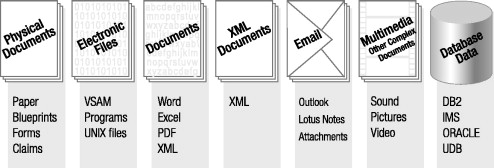
Archive data is information kept for long-term reference, research, compliance, or historical value. Unlike files stored only for everyday use, archived data is preserved so it can be found and understood well into the future. It may include documents, photographs, emails, websites, audio and video recordings, databases, and other digital materials.
Why Archive Data Matters
Organizations and individuals create more digital information than ever. Some of it remains useful long after its original purpose has passed. Businesses may need past records for audits or legal requirements. Researchers may rely on older datasets to study change over time. Communities may preserve photographs, publications, and personal accounts as part of their shared history.
Without a plan for preservation, important information can be lost. Files may be accidentally deleted, storage devices can fail, and software or file formats can become outdated. Archiving helps reduce these risks and makes valuable information easier to locate when it is needed.
What Makes a Reliable Archive?
Keeping a copy of a file is only one part of archiving. A reliable archive also protects the file’s integrity, records useful context, and supports future access.
- Clear organization: Consistent folder structures, file names, and descriptions make materials easier to browse.
- Metadata: Details such as creator, date, subject, format, and rights information help explain what a file is and how it can be used.
- Integrity checks: Checksums and other verification methods can help identify whether files have changed or become corrupted.
- Multiple copies: Keeping copies in separate locations reduces the risk of loss from equipment failure, accidents, or disasters.
- Format planning: Using well-documented, widely supported formats can make files easier to open over time.
- Access controls: Clear policies help balance availability with privacy, security, and legal requirements.
The Archive Data Lifecycle
Archiving is an ongoing process rather than a one-time task. It often begins with selecting which materials have lasting value. The selected files are then organized, described, and stored. Over time, archivists may check the files for damage, create new copies, or move them to updated storage systems. When people need the information, access procedures help them find and use it appropriately.
Planning ahead makes each step easier. For example, recording where a file came from and what it relates to can preserve context that might otherwise be lost. Periodically reviewing storage and access arrangements can also reveal problems before they affect the archive.
Digital Preservation and Long-Term Access
Digital files depend on hardware and software to remain usable. A document may be intact but difficult to open if the program required to read it is no longer available. Long-term preservation therefore involves monitoring both the files and the technology used to access them.
Depending on the material, preservation strategies may include keeping original files, creating access copies, documenting specialized software, or migrating content to a newer format. Each choice should be recorded so users can understand how the archived material has been maintained.
Privacy, Rights, and Responsible Use
Not all archived information should be openly available. Collections can contain personal details, confidential records, copyrighted works, or sensitive information. An archive should consider consent, legal obligations, licensing, and potential harm when deciding what to collect and who may access it.
Good policies make these decisions transparent. They can explain how materials are selected, how long they are retained, what restrictions apply, and how requests for access are handled.
Building an Archive That Lasts
Effective archive data management combines thoughtful selection, dependable storage, useful documentation, regular maintenance, and responsible access. Whether preserving a family collection, organizational records, or digital cultural materials, the goal is the same: to keep information trustworthy, understandable, and available for future use.
With careful planning, archive data can do more than safeguard files. It can preserve evidence, support discovery, and connect people with the knowledge and experiences of the past.
8 Essential Tips for Effective Data Archiving
- Define clear retention periods.
- Use durable, open file formats.
- Keep multiple verified copies.
- Encrypt sensitive archives.
- Document metadata and provenance.
- Test restores regularly.
- Restrict access by role.
- Securely delete expired data.
Define clear retention periods.
Define clear retention periods for each type of archived data so everyone knows how long records should be kept and when they can be reviewed, deleted, or transferred to long-term storage. Set these time frames based on legal requirements, business needs, and historical value, and document any exceptions. Regularly review the schedule to keep it current and avoid retaining data longer than necessary.
Use durable, open file formats.
Use durable, open file formats to help ensure archived data remains accessible over time. Formats with publicly documented specifications and broad software support are less likely to become unusable when a particular program or company disappears. When possible, choose established formats suited to the content—such as plain text, PDF/A, TIFF, or CSV—and keep the original files when conversion is necessary. Documenting any format changes also helps preserve the files’ history and context.
Keep multiple verified copies.
Keep multiple verified copies of archived data to reduce the risk of losing it to hardware failure, accidents, or other unexpected events. Store copies in separate locations or on different types of storage, and check them regularly using checksums or other integrity tools to confirm the files have not changed or become corrupted. A backup is most useful when you know it is complete, readable, and up to date.
Encrypt sensitive archives.
Encrypt sensitive archives to help protect confidential information from unauthorized access, theft, or accidental exposure. Use strong, up-to-date encryption and store encryption keys separately from the archived files, limiting access to trusted people who need it. Be sure to maintain secure backups of the keys—without them, even authorized users may be unable to recover the data.
Document metadata and provenance.
Document metadata and provenance so future users can understand what archived data contains, where it came from, and how it has changed over time. Record details such as the creator, date, file format, collection method, and any processing or migration steps. Clear documentation preserves context, supports authenticity and trust, and makes data easier to find, interpret, and use responsibly.
Test restores regularly.
Test restores regularly to make sure archived data can actually be recovered when needed. A backup may appear complete but still be corrupted, incomplete, or difficult to access, so periodically restore a sample—or a full set of files—to a separate location and verify that everything opens correctly. Document the results, fix any problems you find, and repeat the tests on a schedule so your recovery process stays reliable.
Restrict access by role.
Restricting archive data access by role helps ensure that people can view or manage only the information they need for their work. Define clear roles—such as viewer, editor, and administrator—and assign permissions accordingly, giving elevated access only to authorized users. Review permissions regularly and update them when responsibilities change. This approach reduces the risk of accidental changes, unauthorized disclosure, and misuse while keeping the archive practical to manage.
Securely delete expired data.
Securely delete expired data to reduce privacy risks, limit unnecessary storage, and keep your archive manageable. Before deletion, confirm that the information has passed its retention period and is not subject to a legal hold or other preservation requirement. Then use an approved method that makes the data unrecoverable, including copies on backups or removable media where applicable, and document the deletion according to your organization’s policies.
