
The Convenience of Digital Library Books for Kindle
In today’s digital age, the rise of e-readers like the Kindle has revolutionized the way we read books. With the convenience of carrying thousands of books in a single device, e-readers have made reading more accessible and portable than ever before.
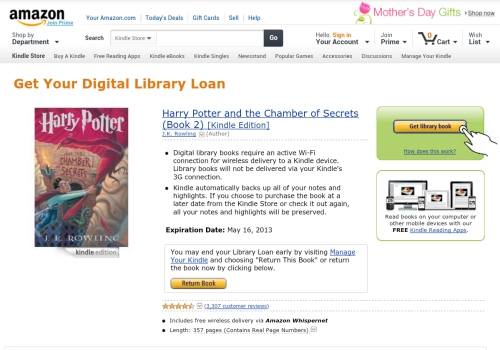
One of the greatest advantages of using a Kindle for reading is the ability to access digital library books. Many public libraries now offer e-book lending services, allowing patrons to borrow and read e-books on their Kindles without ever having to leave their homes.
This digital library system provides a vast array of titles across various genres, from bestsellers to classics, available at your fingertips. With just a few clicks, you can browse through your library’s online catalog, check out an e-book, and have it delivered directly to your Kindle device in seconds.
Not only does this save you time and effort in visiting a physical library, but it also eliminates the need to worry about due dates or late fees. Digital library books for Kindle automatically expire at the end of the lending period, so you never have to worry about returning them.
Furthermore, e-books on Kindle offer customizable reading experiences with features like adjustable font sizes, built-in dictionaries, and bookmarking capabilities. You can highlight passages, take notes, and easily search for specific terms within the text, enhancing your overall reading experience.
Whether you’re an avid reader looking to expand your literary horizons or someone seeking convenience and flexibility in reading habits, digital library books for Kindle offer a convenient and cost-effective way to access a world of literature right from your device.
How to Access and Transfer Digital Library Books to Your Kindle: Top 7 FAQs
- Can you put Libby books on Kindle?
- Why can’t I download library books to my Kindle?
- Can you get digital library books on a Kindle?
- How do I transfer digital books to my Kindle?
- Can I put Libby on my Kindle?
- How do I get digital books on my Kindle?
- Can you get digital library books on Kindle?
Can you put Libby books on Kindle?
One frequently asked question regarding digital library books for Kindle is, “Can you put Libby books on Kindle?” The answer is yes, you can read Libby books on a Kindle device. By using the Libby app, which is provided by OverDrive, users can borrow e-books from their local library and send them directly to their Kindle for reading. This seamless integration between Libby and Kindle allows readers to access a wide range of e-books from their library’s digital collection and enjoy them on their preferred e-reader device with ease.
Why can’t I download library books to my Kindle?
When encountering the issue of not being able to download library books to your Kindle, there are a few common reasons that may be causing this problem. One possible explanation is that your Kindle device may not be compatible with the file format of the library e-book. Different libraries use various e-book formats, and if your Kindle does not support the specific format used by the library, you may encounter difficulties in downloading the book. Another reason could be related to your library account settings or restrictions set by the library itself on borrowing certain titles. It’s advisable to check with your library’s digital lending policies and ensure that your Kindle is compatible with the file formats offered by the library to successfully download and enjoy e-books on your device.
Can you get digital library books on a Kindle?
Yes, you can access digital library books on a Kindle. Many public libraries offer e-book lending services that allow patrons to borrow and read e-books on their Kindle devices. By utilizing these digital library systems, users can browse through a wide selection of titles, check out e-books online, and have them delivered directly to their Kindles with ease. This convenient feature provides readers with access to a vast array of literary works without the need to visit a physical library, making reading more accessible and enjoyable for Kindle users.
How do I transfer digital books to my Kindle?
Transferring digital books to your Kindle is a straightforward process that allows you to enjoy a wide selection of e-books on your device. To transfer digital books to your Kindle, you can use several methods, including sending the e-book directly to your Kindle email address, using the “Send to Kindle” app or software, or connecting your Kindle to your computer via USB and manually transferring the files. Whichever method you choose, ensuring that the e-book format is compatible with your Kindle device is essential for a seamless reading experience. By following these simple steps, you can easily transfer digital books to your Kindle and dive into a world of literary adventures at your fingertips.
Can I put Libby on my Kindle?
Many users often wonder, “Can I put Libby on my Kindle?” The answer is no, as Libby, the popular app for borrowing digital library books, is not directly compatible with Kindle devices. However, there is a workaround for Kindle users to access Libby’s extensive collection of e-books. By utilizing the OverDrive service, which powers Libby, Kindle users can borrow e-books from their local library through the OverDrive website and then send them to their Kindle device for reading. While it may involve an extra step compared to using Libby directly, this method allows Kindle owners to enjoy the benefits of borrowing digital library books through their device.
How do I get digital books on my Kindle?
To get digital books on your Kindle, you can easily access them through various methods. One common way is to utilize the built-in Kindle Store on your device, where you can browse and purchase e-books directly. Additionally, many public libraries offer e-book lending services that allow you to borrow digital books for free and have them delivered to your Kindle. Another option is to transfer e-books from your computer to your Kindle using a USB cable or send them wirelessly via email. Whichever method you choose, getting digital books on your Kindle is a straightforward process that opens up a world of reading possibilities at your fingertips.
Can you get digital library books on Kindle?
Yes, you can access digital library books on your Kindle device. Many public libraries offer e-book lending services that allow patrons to borrow and read e-books on their Kindles. By utilizing these digital library systems, you can browse through a wide selection of titles and check out e-books with just a few clicks, all from the comfort of your home. This convenient service provides Kindle users with access to a vast array of literary works across various genres, making reading more accessible and enjoyable for all.
